
Cashback & ATM near me Cashtic
Cashtic LLCFinance
3.5177.00 Reviews
- Version
- 9.0.75
- Installs
- 100.00K
- Age Rating
- Everyone
Screenshots
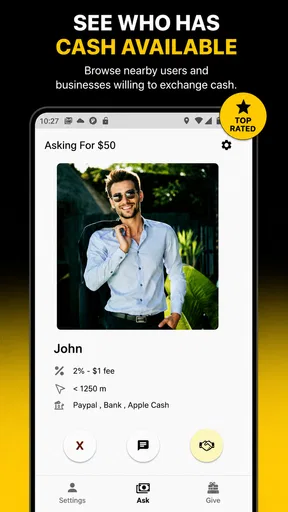
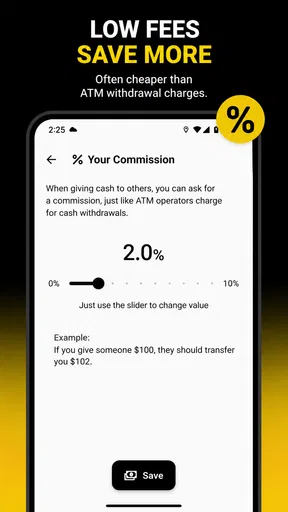
Our Review of Cashback & ATM near me Cashtic
 Analysis by Appyee
I tend to judge finance apps by what happens when I need them, not by how attractive they look in a store listing. Cashback & ATM near me Cashtic is built for a very practical moment: I am away from home, I want to find a nearby place to get cash or discover a cashback option, and I would rather search in one focused tool than jump between several map and banking apps. Cashtic, developed by Cashtic LLC, sits in the finance category and is free to install, with optional in-app purchases ranging from $0.99 to $9.99 per item.
After spending time with it, my impression is that its usefulness depends heavily on where I am and how good my connection is at that moment. When the phone can communicate reliably with the service, the idea is convenient. When the network is slow, unstable, or unavailable, the experience becomes much less predictable because the app’s main purpose is based on finding current nearby locations. That does not make it a poor choice, but it does mean I would treat it as a connected search companion, not as a replacement for my bank’s emergency tools or a guaranteed backup for accessing cash.
What Cashtic is trying to solve
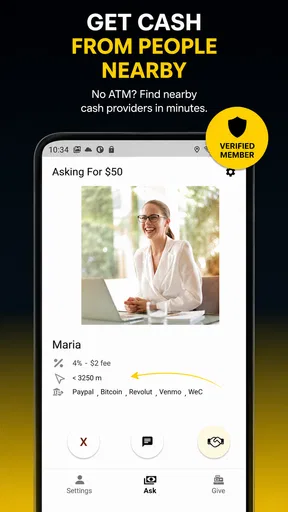
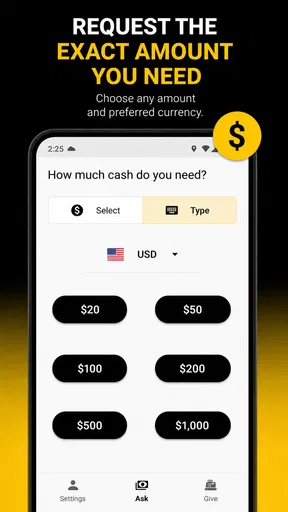
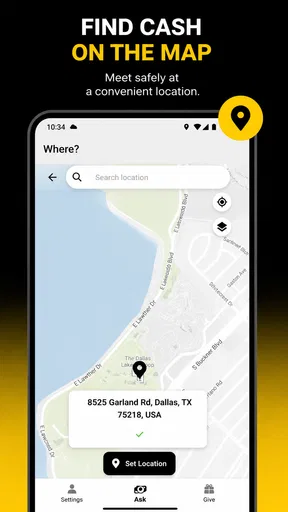
The app brings together three kinds of searches that often overlap in everyday life: cashback stores, ATMs, and peer-to-peer cash nearby. That combination is more useful than it first sounds. A person may be shopping and want to know whether a retailer can provide cashback, traveling and need an ATM, or trying to arrange a cash handoff with someone close by. Instead of beginning with a general web search, Cashtic gives those needs a finance-focused starting point.
I especially like the practical nature of the concept. It is not asking me to build a budget, track every purchase, or learn a complicated financial dashboard. I open it because I need a location or a cash-related option. That narrow purpose keeps the app easier to understand than many broader money-management products. At the same time, the narrow purpose also sets a clear expectation: the quality of the experience depends on whether the nearby results are useful for my exact situation.
The audience is broad. The content rating is Everyone, and the app supports devices running Android 7.0 or later. Cashtic has been available since October 15, 2020, and its current version is 9.0.75. It has passed 100K installs, while its average rating is 3.5 from around 843 ratings and 177 written reviews. Those figures suggest that people do find a practical reason to try it, although the middling average also tells me not to expect a flawless experience in every location.
Why the nearby-search idea matters
Traditional alternatives usually split the task. A banking app may show its own ATMs, a map app may display businesses, and a retailer’s checkout policy may determine whether cashback is possible. Cashtic’s value is the attempt to put these cash-related searches in one place. That saves time when I do not already know which type of option will work.
There is an important trade-off here. A bank’s own ATM locator may be more relevant when avoiding out-of-network fees is my priority. A general map app may offer richer business details or more familiar navigation. Cashtic makes more sense when I want to compare different ways of getting cash nearby rather than search only for my bank’s machines.
How connectivity changes the experience
Cashtic is most convincing when I use it in a normal connected situation: I am in a town or shopping area, my mobile data is working, and I need a quick nearby search. I can decide whether to look for an ATM, a cashback store, or a peer-to-peer cash option, then use the result as a starting point for my next move. The app’s purpose is clear in that context, and I do not have to turn a simple cash question into a long research session.
The network matters because “near me” is not a timeless piece of information. Locations, availability, and the relevance of a result can change. A result that was useful earlier may not be convenient now, and a weak connection can make the search feel stalled even when the phone itself is working normally. I therefore avoid opening Cashtic for the first time only after I am already standing outside a closed shop or urgently looking for cash.
My preferred workflow is to search before I leave a familiar area. If I am heading to an unfamiliar neighborhood, I check the available choices while I still have a stable connection, note the general destination, and then keep a second option in mind. This is not because I assume the app offers offline access; rather, it is a sensible habit for any location-based tool whose usefulness can change with network conditions.
A realistic day-to-day example
Imagine I am visiting a shopping district and discover that one store does not accept the payment method I planned to use. I could open a bank app to locate an ATM, search a map for nearby cash withdrawal points, or ask each retailer whether cashback is available. Cashtic gives me another route: I can check the nearby cashback and ATM possibilities together, then choose the option that involves the least walking or the fewest extra steps.
The smart part of that workflow is not simply finding the closest result. I also consider whether the location is appropriate for the amount of cash I need, whether I recognize the business, and whether I have enough signal to confirm the search. I would not assume that the nearest listed option is automatically the cheapest, safest, or currently open. Cashtic helps narrow the search; I still make the final judgment.
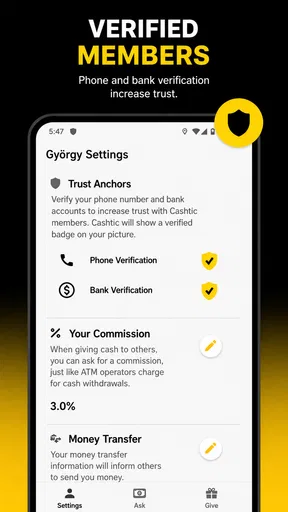
That distinction is important for peer-to-peer cash searches. A nearby person or option may appear convenient, but convenience should not override normal caution. I would verify the details, avoid rushing into an unfamiliar arrangement, and use ordinary personal-safety judgment. The app can help me find possibilities, but it cannot turn an unknown cash exchange into a risk-free transaction.
Using it while moving around
On foot, the app is most useful before I start walking. I prefer to compare the general direction of several possibilities instead of repeatedly checking the phone at every corner. In a car, I would never operate the app while driving; I would search before setting off or let a passenger handle the phone. The finance context makes distraction especially unhelpful, since I may already be dealing with a payment problem or a time-sensitive decision.
Travelers may appreciate the app when they do not know which local businesses offer cashback. However, I would not rely on it as my only travel plan. A foreign or unfamiliar area adds questions about fees, accepted cards, opening hours, and local payment habits. Cashtic can help identify a direction, but my bank’s international guidance and a backup payment method remain more important.
For people with older Android phones, the minimum requirement of Android 7.0 is helpful because it does not restrict the app to only recent devices. Still, compatibility is not the same as comfort. A small screen, an older handset, or limited mobile performance can make map-style searching less pleasant, especially when I am already in a hurry.
What happens when a search goes wrong
The most important limitation is that a nearby result is not a promise. A location may be inconvenient, unavailable, unsuitable for my card, or different from what I expected once I arrive. Network interruptions add another layer of uncertainty. If a search does not load, I first check whether other apps can access the internet. That quickly tells me whether I am dealing with Cashtic specifically or with a wider connection problem.
If the connection is the issue, I move to a recovery plan instead of repeatedly tapping the same search. I may use my bank’s ATM finder, a familiar map service, or ask the retailer directly about cashback. This is one reason I would keep Cashtic alongside, rather than instead of, my banking app. The two tools serve different purposes, and having another route matters when cash is urgent.
If the result itself seems questionable, I compare it with the visible surroundings and, when appropriate, another search source. I do not withdraw cash simply because an entry appears nearby. I check the machine or business name, look for obvious signs that the location is legitimate, and think about fees before proceeding. The app reduces the time needed to find candidates, but it does not remove the need to verify them.
Small habits that make the app more dependable
One useful habit is to search twice when the decision matters: once before leaving and again when I am close to the destination. The first search helps me plan; the second checks whether the current connection and location produce a usable result. This two-stage approach is more reliable than assuming an earlier result will remain convenient.
A second habit is to identify a fallback category, not just a fallback address. If my first choice is a cashback store, I also look for an ATM. If the ATM option is inconvenient, I check whether another nearby route may work. Thinking in categories protects me from becoming stuck when one result fails.
A third is to separate discovery from payment. I use Cashtic to find a possible place, but I use my normal payment method and financial judgment to complete the transaction. That prevents me from treating a location finder as though it were a bank account, a wallet, or a guarantee that a transaction will be approved.
Data-conscious use on mobile
Because Cashtic is designed around nearby searches, I use it selectively when I am watching mobile data. I search for the area and need first, rather than leaving the app open while walking without a clear destination. Once I have a sensible option, I close the search instead of refreshing constantly. This makes the experience less distracting and avoids unnecessary repeated requests over a weak connection.
I also avoid making a long chain of searches while underground, inside a large building, or in a crowded place where the signal is inconsistent. In those situations, the problem is not necessarily the app itself; location and network information can both become less dependable. I would rather wait until I have a stable connection or move to a clearer area than make a cash decision based on an incomplete result.
The free price makes experimenting easy, but I still pay attention to any optional purchase prompt. In-app items cost between $0.99 and $9.99 each, so I would not approve a purchase automatically just because I am trying to solve an urgent cash problem. I first decide whether the free experience already meets my need and whether the extra item is genuinely relevant. That is a simple safeguard, particularly when someone else is using a family device.
Cashtic is also not the sort of app I would leave open as a background companion. I open it for a specific task, search, evaluate the result, and move on. That approach suits the app’s focused role and keeps my phone use more deliberate. For privacy-conscious users, the same habit is sensible: use a location-based finance tool when needed, then return to the rest of the day.
Who will benefit and who should choose something else
I can recommend Cashtic to someone who regularly needs to locate cash-related options in unfamiliar places and wants one finance app to begin the search. It is especially suitable for people who do not want to remember which local stores offer cashback or who want an alternative to searching only through their own bank. The straightforward purpose is a strength when the need is immediate and practical.
I would be more cautious recommending it to someone who only ever uses one bank’s ATMs. In that case, the bank’s own locator may be the better first choice because it is directly tied to the person’s account and fee expectations. Likewise, someone who mainly needs detailed business hours, reviews, directions, or broad local discovery may prefer a general map service.
People who often travel through areas with unreliable mobile service should treat Cashtic as one part of a broader plan. I would prepare by knowing where my bank’s tools are, carrying an alternative payment method, and checking likely options before entering a low-signal area. The app can support that preparation, but I would not make it my only way to obtain cash.
The rating of 3.5 shows a mixed public response rather than universal approval. I read that as a reason to test the app in ordinary, low-pressure situations first. Search for a nearby option when I do not urgently need it, see whether the results fit my area, and learn how comfortable the process feels on my phone. That small trial reveals more than installing it during an emergency.
My connectivity verdict
Cashtic works best when I think of it as a connected directory for cash-related possibilities. Its strongest moment is a stable mobile connection, an unfamiliar area, and a need to compare cashback stores, ATMs, or peer-to-peer cash nearby. It gives that search a clear home and can save me from switching between several unrelated tools.
Its weakness is equally clear: the app cannot make a poor signal, an outdated result, or an unsuitable location disappear. I still need to verify what I find, consider fees and safety, and keep a backup route for urgent situations. The most reliable users will plan one step ahead rather than wait until the last possible moment.
Overall, I see Cashtic as a useful free addition to a mobile finance toolkit, not a complete replacement for banking and map apps. I would install it if I often look for cash options outside my usual routine, especially when cashback could be more convenient than an ATM. My recommendation is conditional but positive: use it for discovery, stay aware of connectivity, and let your own verification make the final decision.
Verdict
Strengths of Cashback & ATM near me Cashtic
- Quickly locates nearby ATMs and cashback options.
- Useful for comparing convenient cash withdrawal locations.
- Simple interface makes searches easy for most users.
- Can help reduce time spent looking for an ATM.
- Helpful when traveling or visiting unfamiliar areas.
Limitations of Cashback & ATM near me Cashtic
- Location accuracy may vary by region or outdated listings.
- Cashback availability depends on participating stores.
- Some listed ATMs may charge additional withdrawal fees.
- Requires location access for the best nearby results.
- Coverage may be limited outside major cities.
Similar Picks in This Category
View All
Google Wallet
Google LLC4.3

Airtel: Recharge, Bank & Loans
Airtel4.0

PayPal - Pay, Send, Save
PayPal Mobile4.2

DANA Indonesia Digital Wallet
PT Espay Debit Indonesia Koe4.5

Binance: Buy Bitcoin & Crypto
Binance Inc.4.8

Cash App
Block, Inc.4.7
Frequently Asked Questions
What is Cashback & ATM near me Cashtic?
Cashback & ATM near me Cashtic is designed to help users find nearby places where they may be able to withdraw cash or request cashback while shopping. The app can be useful when you need quick access to cash and do not want to search manually through maps or visit several locations. Availability and the exact services shown may depend on your country, participating merchants, and local financial networks.
How does Cashtic find nearby ATMs and cashback locations?
The app generally uses your device’s location to display nearby ATMs, stores, or other participating points that may offer cash withdrawal or cashback services. You may need to allow location access for the results to be accurate. Before traveling, check the information shown in the app because opening hours, fees, available cash, merchant participation, and location details can change without notice.
Can I withdraw cash directly through the Cashtic app?
Cashtic should be viewed primarily as a location and discovery tool rather than a replacement for your bank or card provider. Finding an ATM or cashback point in the app does not necessarily mean that the app itself processes your withdrawal. You will normally need an eligible debit card, payment method, or bank account, and the selected location may apply its own transaction rules or fees.
Does Cashback & ATM near me Cashtic charge fees?
Downloading or using the app may be free, but that does not guarantee that every cash withdrawal or cashback transaction will be free. ATM operators, banks, card networks, or participating stores can apply separate charges, limits, or eligibility requirements. Always review the fee information displayed at the ATM or checkout and confirm the terms with your bank before completing a transaction.
What permissions and personal information does Cashtic require?
To provide useful nearby results, Cashtic may request access to your location, and some features may also depend on internet connectivity or device settings. You should review the app’s permission prompts and privacy policy before granting access. If location permission is denied, the app may still open, but nearby search results could be less accurate or require you to enter a location manually.
